Home
Swarm External Secrets



A Docker Swarm secrets plugin that integrates with multiple secret management providers including HashiCorp Vault, AWS Secrets Manager, Azure Key Vault, OpenBao, and OCI Vault.
🚀 Updates
🎓 Google Summer of Code 2026
swarm-external-secrets is participating in Google Summer of Code 2026 incubated under the organization OpenScienceLabs!
For more information, check out GSoC Contribution Guidelines
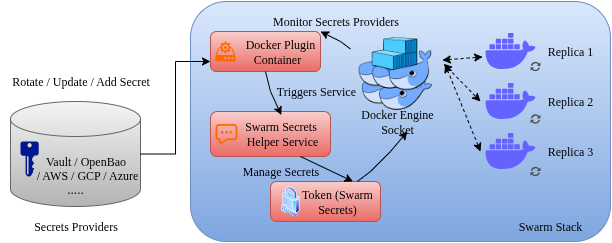
Architecture
Documentation
Please refer to the docs for more information. JWT login and Vault/OpenBao client-token renewal are in docs/jwt.md.
Supported Providers
Features
- Multi-Provider Support: HashiCorp Vault, AWS Secrets Manager, Azure Key Vault, OpenBao, OCI Vault
- Multiple Auth Methods: Token, AppRole, and JWT for Vault and OpenBao, including client-token renewal
- Automatic Secret Rotation: Monitor providers for changes and automatically update Docker secrets and services
- Real-time Monitoring: Web dashboard with system metrics, health status, and performance tracking
- Flexible Path Mapping: Customize secret paths and field extraction per provider
- Production Ready: Includes proper error handling, logging, cleanup, and monitoring
- Backward Compatible: Existing Vault configurations continue to work unchanged
New: Multi-Provider Support
The plugin now supports multiple secret providers. Configure with SECRETS_PROVIDER environment variable:
# HashiCorp Vault (default)
docker plugin set swarm-external-secrets:latest SECRETS_PROVIDER="vault"

# AWS Secrets Manager
docker plugin set swarm-external-secrets:latest SECRETS_PROVIDER="aws"

# Azure Key Vault
docker plugin set swarm-external-secrets:latest SECRETS_PROVIDER="azure"

# OpenBao
docker plugin set swarm-external-secrets:latest SECRETS_PROVIDER="openbao"

# OCI Vault
docker plugin set swarm-external-secrets:latest SECRETS_PROVIDER="oci"
For multi-instance usage (for example, Vault + OpenBao with separate plugin names in Swarm), see docs/multi-provider.md.
New: Real-time Monitoring
Access the monitoring dashboard at http://localhost:8080 (configurable port):
- System Metrics: Memory usage, goroutine count, GC statistics
- Secret Rotation: Success/failure rates, error tracking
- Health Status: Overall system health and provider connectivity
- Performance Tracking: Response times, ticker health, uptime
Monitor Configuration
Installation
-
Build and enable the plugin:
-
Configure the plugin:
-
Use in docker-compose.yml:
HashiCorp Vault:
secrets:
  mysql_password:
    driver: swarm-external-secrets:latest
    labels:
      vault_path: "database/mysql"
      vault_field: "password"
AWS Secrets Manager:
secrets:
  api_key:
    driver: swarm-external-secrets:latest
    labels:
      aws_secret_name: "prod/api/key"
      aws_field: "api_key"
Azure Key Vault:
secrets:
  database_connection:
    driver: swarm-external-secrets:latest
    labels:
      azure_secret_name: "database-connection-string"
OpenBao:
secrets:
  app_secret:
    driver: swarm-external-secrets:latest
    labels:
      openbao_path: "app/config"
      openbao_field: "secret_key"
OCI Vault:
secrets:
  db_password:
    driver: swarm-external-secrets:latest
    labels:
      oci_secret_name: "my-database-password"
      oci_field: "password"
- Optional: enable plugin log sidecar (for
docker compose logsvisibility):
On Linux, the default plugin log path is /run/swarm-external-secrets/plugin.log.
macOS and Windows filesystems do not support this /run/** path by default, so
create a writable log directory on the host and point PLUGIN_LOG_PATH at it.
sudo mkdir -p /run/swarm-external-secrets
sudo touch /run/swarm-external-secrets/plugin.log
docker compose -f docker-compose.yml -f docker-compose.logs.yml up -d
docker compose -f docker-compose.yml -f docker-compose.logs.yml logs -f secrets-logger
Example for macOS or Windows Docker Desktop:
mkdir -p ./logs
touch ./logs/plugin.log
docker plugin set swarm-external-secrets:latest \
  PLUGIN_LOG_PATH="$PWD/logs/plugin.log"
| Provider | Status | Authentication | Rotation |
|---|---|---|---|
| HashiCorp Vault | ✅ Stable | Token, AppRole, JWT | ✅ |
| AWS Secrets Manager | ✅ Stable | IAM, Access Keys | ✅ |
| Azure Key Vault | ✅ Stable | Service Principal, Access Token | ✅ |
| OpenBao | ✅ Stable | Token, AppRole, JWT | ✅ |
| OCI Vault | 🚧 Beta | API Key, Instance Principal | ✅ |
| GCP Secret Manager | 🚧 Placeholder | - | - |
Quick Start Examples
HashiCorp Vault
docker plugin set swarm-external-secrets:latest \
    SECRETS_PROVIDER="vault" \
    VAULT_ADDR="https://vault.example.com:8200" \
    VAULT_TOKEN="hvs.example-token"
AWS Secrets Manager
docker plugin set swarm-external-secrets:latest \
    SECRETS_PROVIDER="aws" \
    AWS_REGION="us-west-2" \
    AWS_ACCESS_KEY_ID="AKIAIOSFODNN7EXAMPLE"
Azure Key Vault
docker plugin set swarm-external-secrets:latest \
    SECRETS_PROVIDER="azure" \
    AZURE_VAULT_URL="https://myvault.vault.azure.net/" \
    AZURE_TENANT_ID="12345678-1234-1234-1234-123456789012"
OCI Vault
# Base64-encode your PEM private key
OCI_KEY=$(base64 < ~/.oci/oci_api_key.pem | tr -d '\n')

docker plugin set swarm-external-secrets:latest \
    SECRETS_PROVIDER="oci" \
    OCI_AUTH_METHOD="api_key" \
    OCI_REGION="us-ashburn-1" \
    OCI_TENANCY_OCID="ocid1.tenancy.oc1..example" \
    OCI_USER_OCID="ocid1.user.oc1..example" \
    OCI_FINGERPRINT="aa:bb:cc:dd:ee:ff:00:11:22:33:44:55:66:77:88:99" \
    OCI_PRIVATE_KEY="${OCI_KEY}" \
    OCI_VAULT_OCID="ocid1.vault.oc1..example"
License
Explore the Repository
If you want to explore the repository or read more, check out Ask DeepWiki.